
Monitoring changes in a competitor's WordPress plugin ranking (or a theme's) means watching their overall Rank and their WP.org search position for your category's actual keywords as their own tracked pair, separate from the broader monthly competitor check-in - because a ranking move usually has a specific, identifiable cause worth naming, not just a number worth logging.
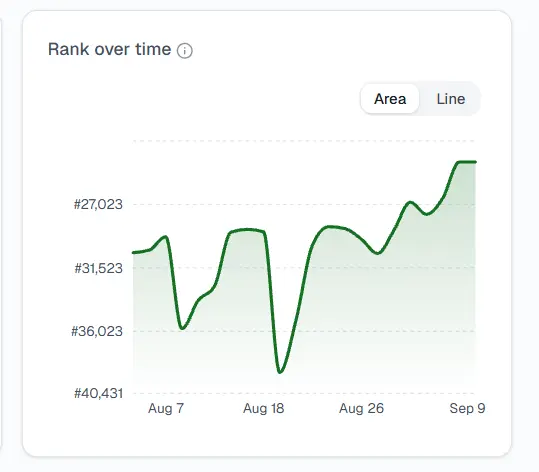
Open the Growth Tracker and add the competitor - the same tool works whether they're a plugin or a theme - and you'll get their Rank history and their keyword rank tracking as two separate charts, which is what makes it possible to tell the two causes below apart instead of checking WP.org's search results by hand every week.
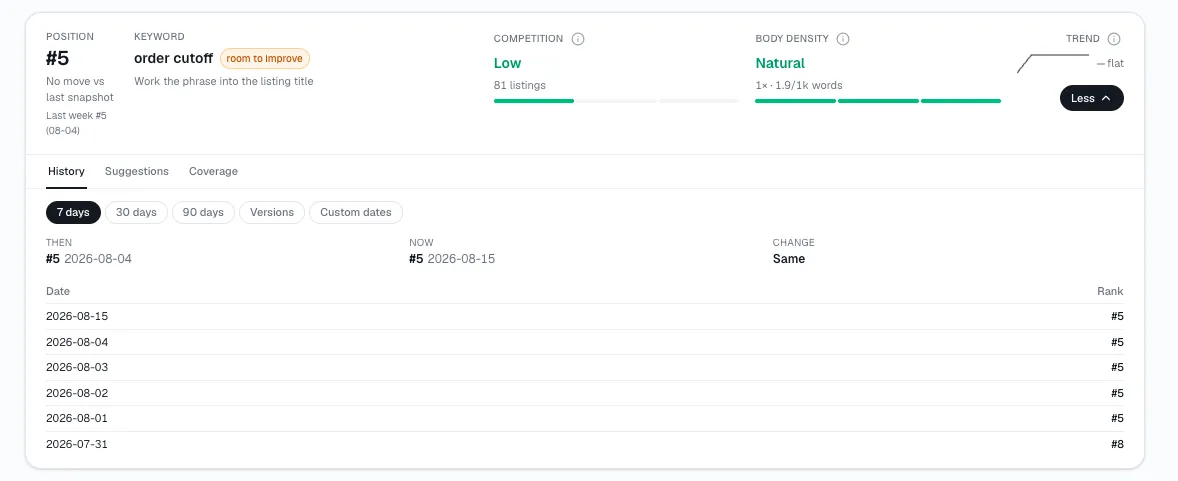
The short version: To monitor a competitor's WordPress plugin ranking changes, track their overall Rank and their WP.org search position for your category's keywords as their own separate pair, apart from your regular monthly competitor check-in.
This is narrower than the routine monthly check-in
Tracking your competitors broadly means glancing at installs, growth, momentum, and release activity across everyone on your list once a month. That routine will tell you Rank or a keyword position moved. It won't tell you why - which is a separate, more specific question this post is about, and one that's worth answering on its own timeline rather than waiting for the next scheduled pass.
Think of the two as different zoom levels on the same competitor. The monthly routine is the wide shot - four numbers, glanced at across everyone you track, meant to flag that something happened. This post is the zoomed-in shot on one specific pair of numbers, meant to explain what actually happened and why, once the wide shot has already told you something's worth a second look.
Why a rank move and a keyword move aren't the same signal
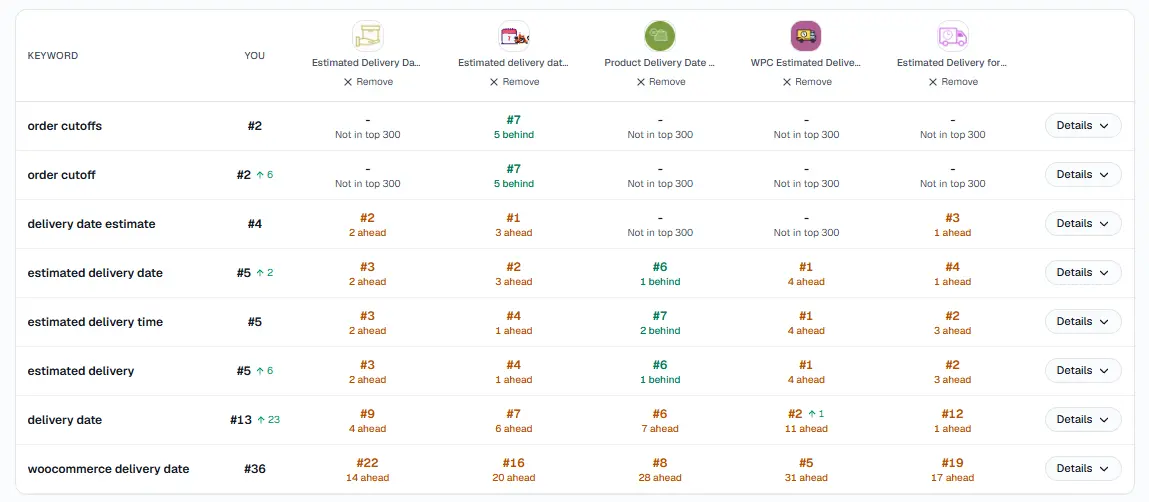
Rank moving is often about installs, ratings, and support resolution shifting together - a general strength change. WP.org search position moving for a specific keyword is narrower and often more tactical, and it can move within weeks, faster than Rank typically shifts. Any of these could be the reason:
A readme rewrite.
A tag change.
A sudden improvement in how fast support tickets get resolved.
What each cause actually looks like when you check it
Each of the three causes above leaves a specific trace, not just a moved number:
- A readme rewrite shows up as new or reworded copy in the plugin's WordPress.org description, often with the target keyword now appearing in the opening lines where it wasn't before. Check the "Description" and "FAQ" sections of their listing against what you remember from a few months back.
- A tag change shows up in the plugin's own header metadata - a keyword that's now listed as a tag that wasn't there previously. This is a smaller, more mechanical edit than a readme rewrite, and easy to miss unless you're specifically comparing tag lists.
- Faster support resolution doesn't show up in the listing copy at all - it shows up in the support forum itself, as a shorter gap between a ticket being opened and getting an official reply. This one takes longer to confirm, since it means sampling several recent threads rather than reading one page.
So their ranking jumped - what actually happened?
I'd read their readme and tags again specifically if a competitor's search position improves for a keyword you also target - they may have deliberately optimized for that exact term, which is detectable and worth knowing before it fully plays out. This is consistent with what I usually see: a general Rank improvement with no specific keyword movement is more often a byproduct of overall growth than a deliberate search-optimization move.
And if it drops instead?
A falling Rank paired with flat or declining installs is a real weakening. A falling keyword position with stable Rank and installs is narrower - possibly just a WordPress.org algorithm adjustment, or another competitor specifically targeting that same term. I've found the two droppings look similar on a single chart, but they mean different things.
A quick way to read what moved
| What you see | Likely cause | What to check next |
|---|---|---|
| Keyword position up, Rank flat | A deliberate readme or tag optimization for that term | Their listing description and tag list |
| Rank up, no single keyword moving | General growth in installs, ratings, or activity | Their broader monthly numbers, not the listing copy |
| Rank down, installs flat or declining | Real weakening, not noise | Their recent reviews and release activity |
| Keyword position down, Rank and installs stable | A WP.org algorithm shift or another competitor targeting the same term | Who else newly ranks for that same keyword |
Track both without guessing
That's the split the Growth Tracker keeps for you automatically - a general Rank move on one chart, a keyword-specific move on another - since checking WP.org's own search results by hand for a list of terms every week isn't something most people keep up for long.
Questions specific to watching rank and keyword position
How often should I check Rank and keyword position specifically?
More often than the quarterly full-scorecard pass, since keyword position can move within weeks. A biweekly or monthly glance at just these two charts, on top of the broader monthly check-in, is enough to catch most moves while they're still fresh.
Can a keyword position move without any of the three causes above?
Yes - WordPress.org's own search algorithm changes periodically, independent of anything a competitor did. If you can't find a readme change, tag change, or support-speed shift after checking, a platform-side adjustment is the remaining explanation, and it's worth checking whether other plugins in the category moved too.
Does a rank change always mean I should react to it?
No - a small move within a normal range for that competitor usually isn't worth acting on. Reserve an actual response for a change that's both sizable and has a specific, confirmed cause behind it, rather than reacting to every fluctuation on the chart.
What to do once you've confirmed the cause
In my view, confirming a readme rewrite or a tag change isn't the end of the process - it's information about what a competitor thinks matters right now. If they've newly optimized for a keyword you also target, that's worth a look at your own listing for the same term: are you actually ranking for it, or has this been an open opportunity they just noticed before you did?
This is what usually shows up, in my checks: a support-speed improvement is a different kind of signal to act on. It's not something you copy overnight, but it's worth checking your own average response time against theirs - if their keyword position is climbing partly because of it, a widening support-speed gap is one of the more controllable things to close.
Keep the two signals separate going forward
I get the temptation to fold Rank and keyword position back into one number once you've read this far, but keeping them apart is what makes the cause-finding walked through in this post possible in the first place. A single blended "ranking" metric would hide exactly the distinction that tells a deliberate SEO move apart from ordinary growth, or a real competitive threat apart from a platform-wide wobble.