
WordPress.org tells you your plugin has "10M+" active installs. It tells Elementor the same thing. Elementor is estimated at 19 million.
That's the problem I run into every time I check my own numbers on WordPress.org: the band your plugin or theme sits in can hide a nine-million-install spread, and it only changes once every few years.
Quick verdict: open statwp.com/plugins/ plus your plugin's slug to check any WordPress plugin's real installs, downloads and growth - you'll see an estimated install count, daily and total download history, rank movement, a 30-day growth figure and a one-word momentum verdict, free, no account.
I'm going to walk you through the four questions that page answers for a plugin author: whether you're growing, whether you're losing ground, whether your users are stuck, and whether your rating is a real problem. I pulled every figure below off StatWP on 9 August 2026.
Open your plugin's page in 20 seconds
Go to statwp.com and on the search bar, search for your plugin.
That's the whole thing. Themes work the same way at statwp.com/themes/{slug}. Keep the page open. The rest of this is what to read on it, in what order.
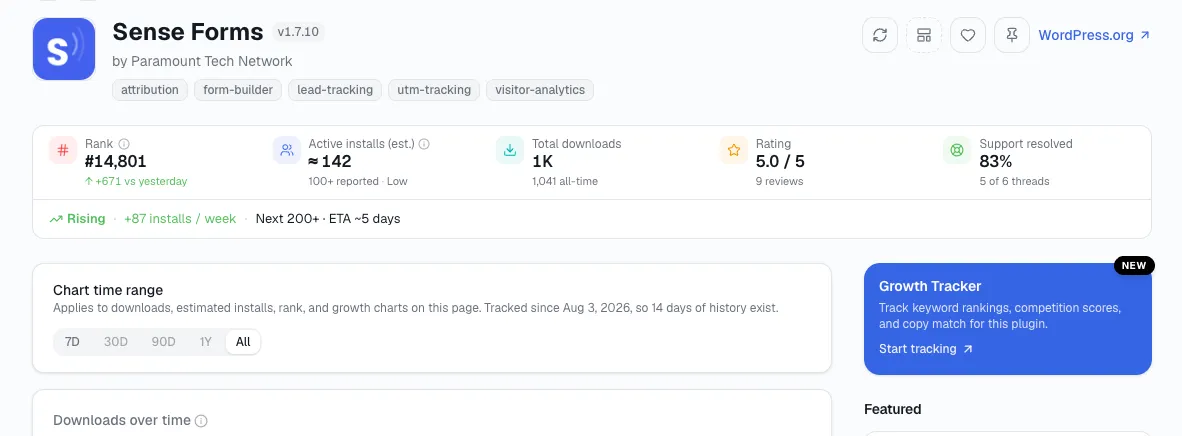
The overview card that loads for any plugin slug — install estimate, rank, growth, and momentum in one view.
Is your plugin growing or stalling?
Downloads going up doesn't mean growing. The number that actually tells you is one you compute yourself in ten seconds: 90-day downloads divided by estimated active installs. Call it your quarterly pull rate - how much update and install activity each existing user generated last quarter.
Here's the scale I use, built from six of the largest plugins in the directory as calibration:
Plugin | Downloads, 90d | Est. installs | Pull rate | Releases, last year |
|---|---|---|---|---|
Yoast SEO | 37.4M | 14,500,000 | 2.58 | 2 |
Elementor | 45.7M | 19,000,000 | 2.41 | 3 |
WooCommerce | 13.6M | 7,000,000 | 1.94 | 1 |
Contact Form 7 | 6.8M | 10,000,000 | 0.68 | — |
Akismet | 3.9M | 5,900,000 | 0.66 | 2 |
Classic Editor | 5.7M | 9,450,000 | 0.60 | — |
Elementor's install base pulled roughly four times as much as Classic Editor's, per install. I've picked this up from checking a bunch of these — that's the real gap between a plugin that ships and a plugin that sits.
Do this: compute your pull rate once a month and write it down. A single reading means nothing; the trend is everything - pull rate is one input into a fuller monthly growth-tracking routine that also checks rank, momentum and version adoption together. If it falls for two consecutive quarters while your install estimate holds, you don't have a marketing problem - you have a release problem, and shipping something is the fix.
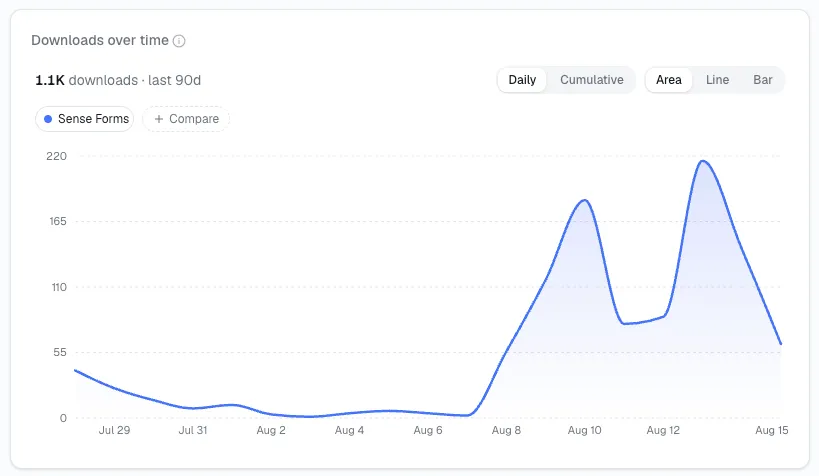
Downloads-over-time — the 90-day download total behind the pull-rate calculation above.
Are you gaining or losing ground?
Your download count can climb while you slide, because the whole directory is growing around you. Rank is the number I trust most here - it's the only one that accounts for everyone else.
It's also the only one that moves fast enough to be useful. Classic Editor sits at rank #4 with an estimated 9.45 million installs. If it slips to the 8M+ band, WordPress.org will show that once, possibly years from now. Rank changes daily, so a slow slide is visible in the rank chart long before the band ever blinks.
Do this: check your rank weekly, not your installs. If you drop three or more positions over 90 days while your own downloads look flat, someone in your category is growing and you're standing still. That's the moment to look at who.
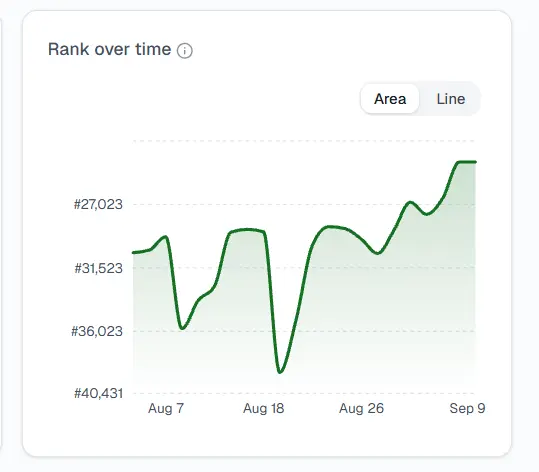
Rank-over-time — the weekly-check view that catches a slow slide long before the install band changes.
Are your users stuck on old versions?
This is the check I see almost no author run, and it's where the real risk lives.
Contact Form 7's version distribution reads v6.1 at 59.42%, v6.0 at 9.05%, v5.9 at 5.98% - and 25.55% on versions old enough that they don't get listed individually. A quarter of ten million installs running unlisted old builds is a live security surface, and it's completely invisible on the WordPress.org listing.
Do this: if more than about 20% of your installs sit on unlisted versions, stop shipping features. Either your update path is broken, or a past release broke something badly enough that people froze. Find out which before you add anything.
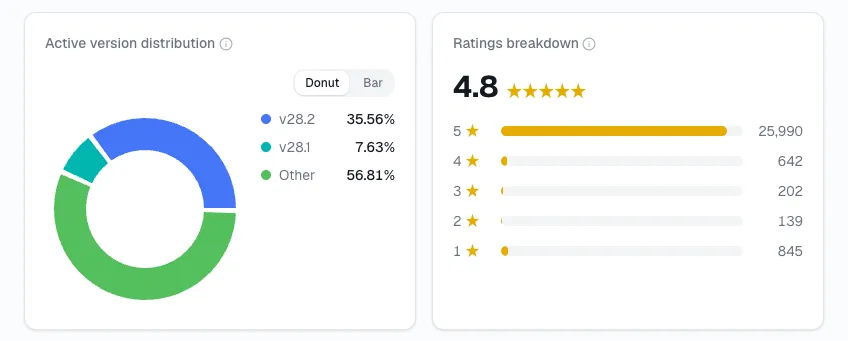
Active version distribution - where the “installs on unlisted old versions” figure comes from.
Is your rating a real problem, or two angry people?
This is the read I go with: the average is close to useless on its own. The shape is what actually tells you what's wrong.
Plugin | Average | Reviews | 5★ | 1★ | 1★ share |
|---|---|---|---|---|---|
Classic Editor | 4.9 | 1,244 | 1,183 | 16 | 1.3% |
Yoast SEO | 4.8 | 27,817 | 25,989 | 845 | 3.0% |
Akismet | 4.7 | 1,186 | 1,033 | 57 | 4.8% |
WooCommerce | 4.5 | 4,812 | 3,988 | 409 | 8.5% |
Elementor | 4.5 | 7,292 | 6,140 | 682 | 9.4% |
Contact Form 7 | 4.0 | 2,176 | 1,470 | 404 | 18.6% |
Contact Form 7's 4.0 isn't a mediocre plugin. It's a well-liked one - 1,470 five-star reviews - with a large, persistent minority who hit something specific and hated it. Nearly one review in five is a single star.
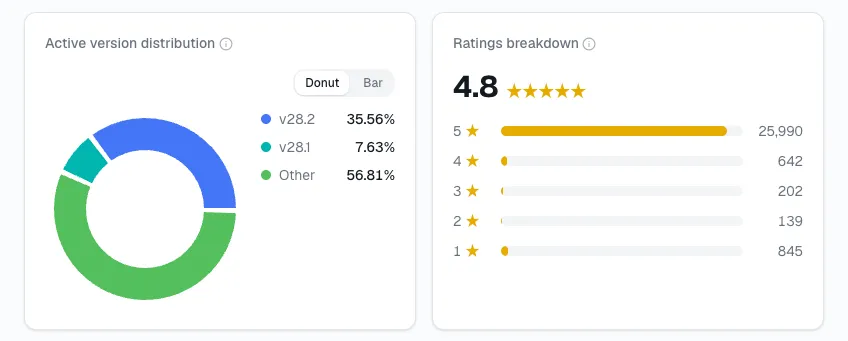
Ratings breakdown - the 5-star/1-star split that separates “well-liked with one recurring problem” from genuinely mediocre.
Support resolution rate is the companion number:
Plugin | Resolved | Threads |
|---|---|---|
WooCommerce | 86% | 170 of 198 |
Elementor | 77% | 34 of 44 |
Contact Form 7 | 38% | 16 of 42 |
Classic Editor | 0% | 0 of 6 |
Akismet | 100% | 2 of 2 |
Do this: if your one-star share is above roughly 15%, you have one recurring failure, not general dissatisfaction — go read those reviews and they will name it. And if your support resolution is under 50% on twenty or more threads, that's the cheapest reputational repair available to you. Classic Editor rates 4.9 stars and has resolved zero of six threads; the stars are not protecting it.
When these numbers will mislead you
Four ways I've seen this data get misread, worth knowing before you act on any of it.
A 30-day window on a slow-release plugin is mostly noise. WooCommerce shipped one release in the last year and shows −35.9% over thirty days. Most of that is an update wave washing out, not seven million sites leaving.
When two windows disagree, I don't trust either one alone. Yoast SEO's 30-day change is −20.3%, which looks like trouble. Its pull rate is 2.58, the highest here. That gap is release timing.
Downloads are not people. Automatic updates, CI pipelines and staging rebuilds all increment the counter.
The install number is an estimate, and it says how sure it is. Most carry a High confidence flag, anchored to the moment the plugin crossed a WordPress.org band. Classic Editor's reads Low, printed on its page — treat that as a wide range, not a precise figure.
Other ways to get this data
Method | What you get | Where it falls short |
|---|---|---|
WordPress.org listing | Your band, average rating, last updated | Bands only, 10M+ is the ceiling, no history, no rank |
WordPress.org APIs | Banded installs, daily downloads, version share as JSON | Still rounded; no rank, no stored history — you build the pipeline |
Your own daily snapshots | Exactly the fields you want | Months before the history is useful |
StatWP | Estimated installs with confidence, download history, rank movement, momentum, rating shape, support rate | Estimates revise; confidence is Low on some listings |
If you need your band once, WordPress.org is fine. If you need to watch a trend month over month, it's StatWP or a pipeline you maintain yourself.
FAQs
Is it free?
Yes - StatWP's install estimates, download history, rank, ratings and momentum data are free for both plugins and themes, with no account required. Paid plans start at $19/month and add keyword rankings, niche research and multi-competitor comparison.
Does WordPress.org publish exact install counts anywhere?
No - WordPress.org only shows rounded install bands like "10M+," never an exact number. WordPress core contributor Otto42 confirmed on the meta ticket that install counts are "rounded to the first significant digit" and that raw data isn't published because "it can be misinterpreted."
How accurate is the install estimate?
Install estimates are most accurate right after a plugin crosses into a new WordPress.org band, which StatWP flags as High confidence. Estimates without a recent band crossing are flagged Low, and each plugin's page shows which applies.
What does "Declining" mean?
A "Declining" momentum verdict means a plugin's downloads fell over the trailing 30 days and are trending toward a lower install band. It measures the rate of change, not raw installs, so it doesn't mean people uninstalled this week - check your release cadence first.
Can I track a competitor the same way?
Yes - open statwp.com/plugins/{slug} (or /themes/{slug} if they make a theme instead) with a competitor's slug to see their installs, downloads, rank and momentum with the same free tool.
What counts as a good pull rate?
There's no fixed "good" pull rate, but among large WordPress plugins it typically runs from about 0.6 to 2.6. Actively updated plugins like Yoast SEO and Elementor sit above 2.0, while older, set-and-forget plugins like Contact Form 7 and Classic Editor sit below 1.0.
Do downloads matter more than active installs for tracking growth?
Active installs matter more than downloads for tracking real growth. Downloads spike from automatic updates, CI pipelines and staging rebuilds that have nothing to do with new users, while a genuine change in active installs reflects who's actually running the plugin.
Next, if you're deciding what to build rather than tracking what you shipped
Everything above assumes you already have a plugin in the directory. Validating a new idea is a different job with different numbers - you're looking for stale leaders, categories where a listing has a large install base, an old last-updated date and poor support resolution. Classic Editor is the shape of it: 9.45 million estimated installs, zero of six support threads resolved, downloads down 18.4%.
Start from the plugin catalog or theme catalog and sort by installs, looking for listings where the install count and the maintenance signals disagree.
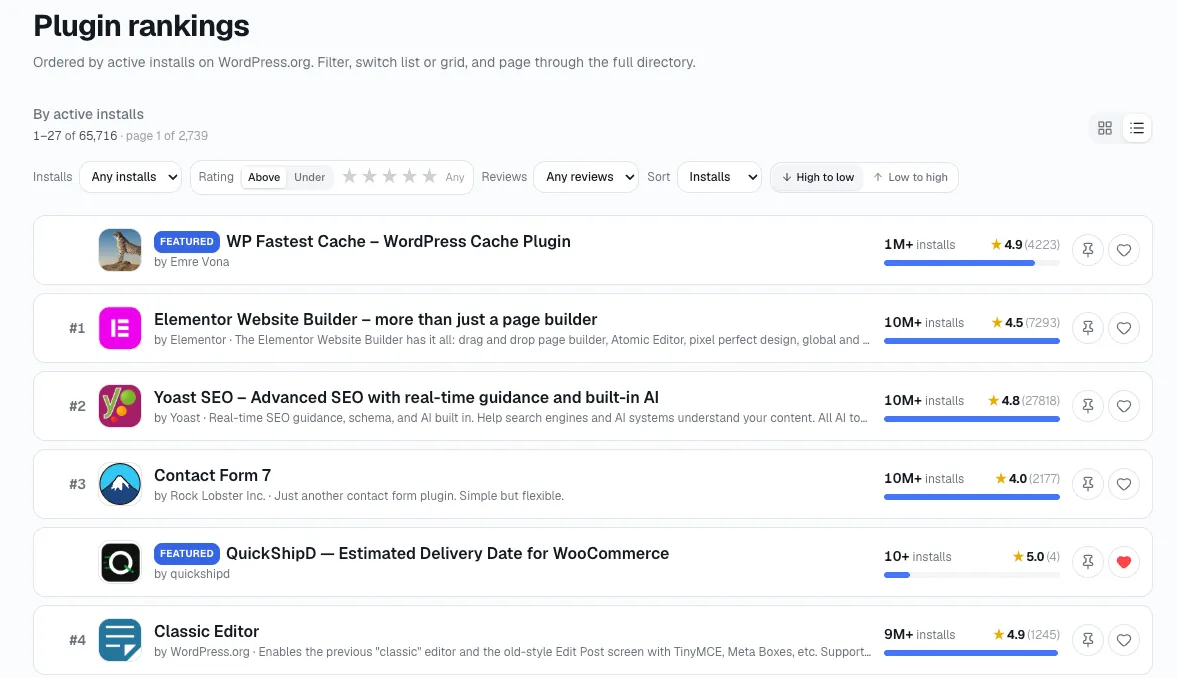
The plugin catalog, sorted by installs — where you'd look for listings whose install count and maintenance signals disagree.
For today, though: open your own plugin's page - or your theme's, you can do this for themes too - and compute your pull rate. I check mine the same way every month, and it's rare that I don't find something I didn't already know.
Sources: StatWP methodology · StatWP pages for Elementor, Yoast SEO, Contact Form 7, Classic Editor, WooCommerce, Akismet, read 9 August 2026.