
Tracking a WordPress plugin's growth means running the same seven-question monthly check every time - is growth increasing, are downloads moving with it, is momentum building or fading, is rank moving up or down, did the last update coincide with any of that, is sentiment improving, and are users actually adopting the latest version - so a real shift gets caught the month it happens, not noticed by accident three months later.
This is a different job from analyzing your competitors, which watches other plugins. This one watches yours, on a fixed monthly schedule, and it only works if you actually run the same seven questions every time rather than whichever ones catch your eye.
A StatWP plugin page already tracks all seven of these signals as a running history for any plugin (or theme), including your own - more on exactly where to see them together once you know what each one is actually asking. For a closer walkthrough of reading those numbers on a single plugin's page, see how to check any WordPress plugin's real installs, downloads and growth.
Quick Verdict: To track your WordPress plugin's growth properly, run the same seven-question monthly check every time - growth, downloads, momentum, rank, release activity, ratings, and version distribution - so a real shift gets caught the month it happens.
The number most people watch first is the wrong one
What tends to happen, from what I've seen: total downloads is the number that's easiest to check and the least useful to watch, because it only ever goes up. A plugin can lose active installs every month for a year while its downloads counter keeps climbing, since nothing about an uninstall ever subtracts from it. If downloads is the only number on your dashboard, decline looks identical to growth.
Active installs is the number that can actually fall - but WordPress.org doesn't keep a history of it for you anymore. A historical growth chart used to sit on every plugin page until it was pulled in October 2022, after WordPress.org meta contributors concluded the calculation behind it was unreliable, per WP Tavern's reporting on the removal. What's left today is a single current figure with no built-in history. If you don't log it yourself on a schedule, there's no record anywhere of what it was three months ago.
Ask these seven questions, in order, every month
1. Growth - is estimated install growth increasing? This is the headline number, and the one every other question in this list exists to explain - measuring it the same way every month, rather than eyeballing it, is covered in how to measure plugin growth month over month. A positive but shrinking growth rate is a different situation than a positive and accelerating one, which is exactly what question 3 is for.
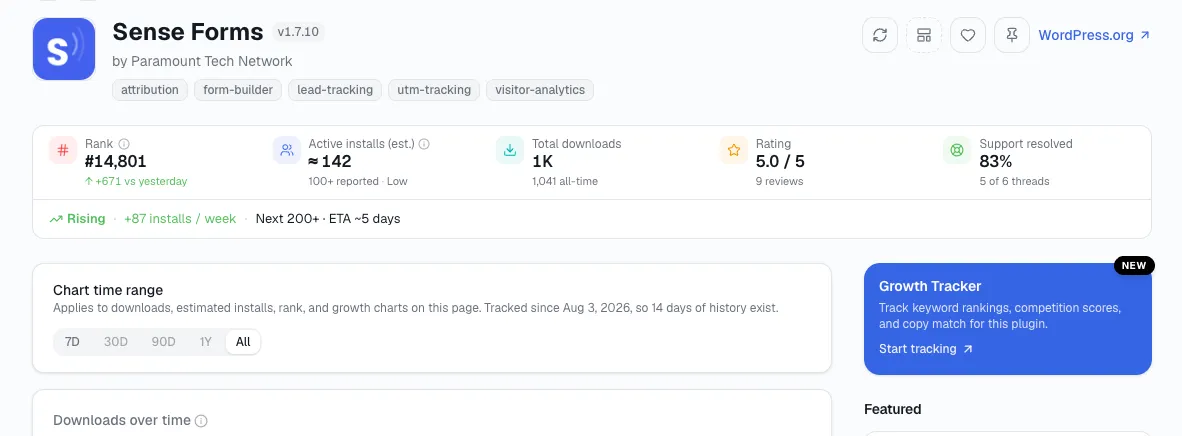
2. Downloads - are downloads moving in the same direction? Downloads should generally trend with growth. When they don't - downloads climbing while estimated installs stall or fall - the gap between the two is itself a signal, roughly tracking how many people are trying the plugin and not keeping it - the mechanics of reading the two against each other are covered in using downloads and active installs to measure growth.
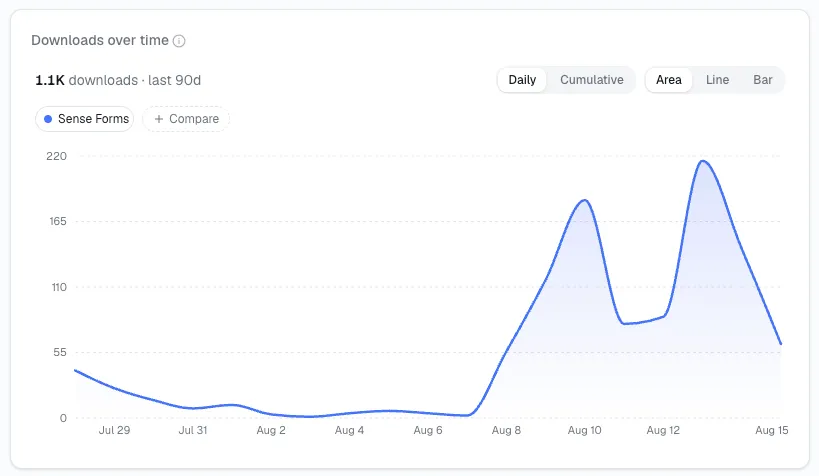
3. Momentum - is growth accelerating or slowing? Two months of positive growth can mean you're building speed or losing it, depending on whether this month's rate beat or missed last month's. Momentum is the second derivative, and in my experience it's usually the first place a real change shows up before growth itself turns negative - see what plugin momentum actually means for how to read it.
4. Rank - is the product moving up or down? Rank moves with the combination of installs, ratings, and support health shifting together. I always take a closer look at the other signals on this list before assuming a rank drop with flat installs is noise - for the mechanics of watching rank specifically over time, see how to track WordPress plugin rankings over time.
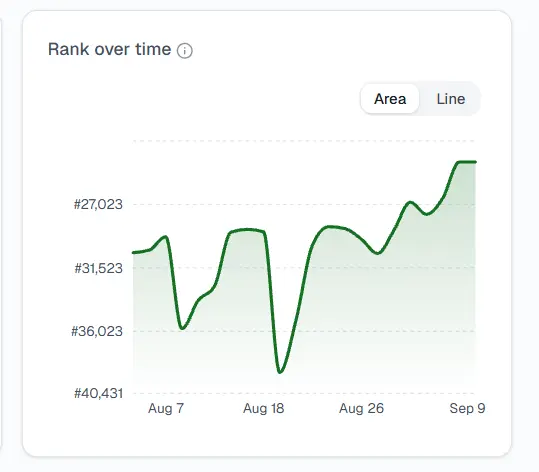
5. Release activity - did updates coincide with changes? Line your own release dates up against whatever moved this month. A growth dip the same month as a release is a different finding than a growth dip in a quiet month - one points at the update, the other points somewhere else entirely.
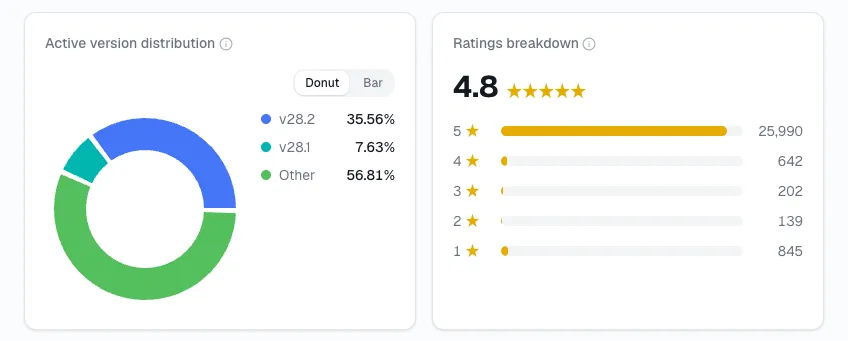
6. Ratings - is user sentiment improving? Watch the trend in recent reviews, not the lifetime average, which moves too slowly to reflect this month specifically. I've noticed a recent dip in sentiment often shows up here before it shows up in installs.
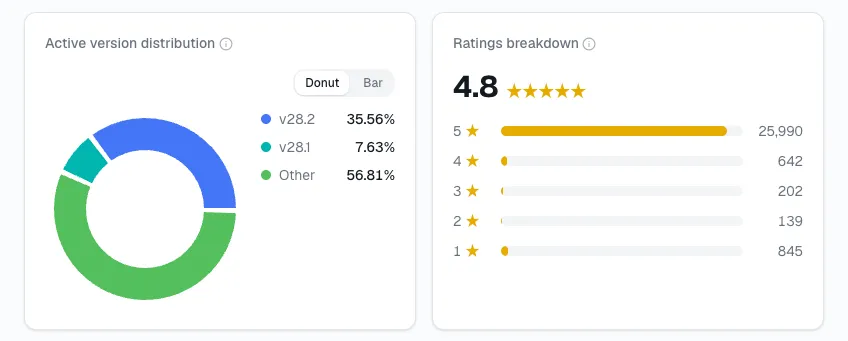
7. Version distribution - are users adopting your latest version? A base that's slow to update is a base that's slow to benefit from whatever you just shipped - and it's a leading indicator of how much of your install base a new feature will actually reach this month versus next quarter.
Automate This Monthly Check with Growth Tracker
Run it the same way every month, and it stops feeling like a chore
Answer all seven questions on the same day every month, in the same order, so you're comparing this month's answers to last month's rather than to a moving target. In my own monthly checks, most months the answer to most questions is "about the same as last month" - that's fine. The routine's value is in catching the month where several answers move together, which is a much stronger signal than any single one moving alone.
Write down what happened, not just what the numbers did
Keep one more column next to the seven answers: the date of your own releases, WordPress core updates, directory policy changes, and anything a competitor launched. I've found a trend by itself only tells you that something happened; the event log next to it is what turns that into an answer.
Skip the manual tracking - a tool can hold all seven for you
I ran this by hand for a long time - none of the above requires software, seven questions and a monthly reminder does the job. But here's the shortcut: open your plugin's page on StatWP (or your theme's, if that's what you maintain), search its name, and growth, downloads, momentum, rank, ratings, and version distribution are all sitting there together already, as a running history instead of a snapshot you'd otherwise have to screenshot and date yourself every month.
See All Seven Signals in One Place
Quick answers
How often should I actually run this? Monthly, on the same day each time, so consecutive checks are comparable. Increase frequency the month you ship a release.
What if most of the seven answers haven't changed? That's the expected result most months - the check is designed to catch the month several answers move together, not to produce a dramatic finding every time.
Do I need a dedicated analytics tool for this? No - a spreadsheet with seven columns is enough. A lookup tool like StatWP saves you from manually checking and recording each number yourself, for a plugin or a theme; it's a convenience, not a requirement to start.
What should I do the month several answers move together? Treat it as the signal worth investigating, not a coincidence to shrug off. Line the date up against your own releases and anything else you know happened that month - a release, a WordPress core update, a competitor launch - before deciding what caused it.
Is this routine different for a brand-new plugin with no history yet? Mostly it just starts later. Run the same seven questions from your first month of data, but treat the first couple of months as a baseline rather than a trend - you need at least two logged months before momentum, question 3, means anything at all.
Where this fits in the bigger picture:
Niche research told you where to look.
Plugin research told you whether to build.
Competitor analysis keeps an eye on everyone else.
This monthly check is the record of whether it's actually working - including benchmarked against the competitors you're tracking, on the same seven signals.
Start Your Monthly Growth Check
Run the same seven questions on the same day every month, and tracking your plugin's growth stops being an occasional guess and becomes a routine you can actually trust.