WordPress Plugin Stats Tools Compared: StatWP vs WP-Rankings vs PluginSpy vs WP Analyze
I put StatWP on top of this comparison because it's the only one of the four that combines plugin-level growth tracking, niche-level crowding analysis, a multi-way Compare tool, and a WordPress.org readme checker in a single product. WP-Rankings, PluginSpy, and WP Analyze each do one narrower job well — a daily dashboard, keyword-rank depth, and a clean competitor-comparison screen, respectively — but none of them combines all of that the way StatWP does.
I checked everything below against each tool's own live homepage, not secondhand claims. Tools like these ship features fast, so treat this as a snapshot from when I researched it and verify anything decision-critical on the vendor's own site before you commit to one.
The four tools at a glance
Four real, currently-operating tools, compared on the dimensions that actually differ between them:
| Feature | StatWP | WP-Rankings | PluginSpy | WP Analyze |
|---|---|---|---|---|
| Own framing | Research-to-growth toolkit for plugin & theme builders | “The daily dashboard for WordPress plugin developers” | Plugin analytics & statistics tracker, keyword-first | “The numbers behind every WordPress plugin” |
| Data refresh | Daily | Daily | Not stated on homepage | Daily (rank recalculated daily) |
| Side-by-side comparison | Yes — Compare tool, more than two at once | Yes — 3 free comparisons | Not found advertised | Yes — one screen, free with an account |
| Dedicated keyword-rank tracking | No — not this tool's focus | Yes — 5 free keyword rankings per plugin | Yes — this is its signature feature | Not found advertised |
| Niche/category crowding analysis | Yes — Niche Research | Not found advertised | Not found advertised | Not found advertised |
| Growth alerts / watchlists | Yes — Growth Tracker alerts | Planned (“vote to unlock,” not live as of this writing) | Not found advertised | Not found advertised |
| Readme / listing checker | Yes — Readme Checker | Not found advertised | Not found advertised | Not found advertised |
| Theme coverage (not just plugins) | Yes — 15,000+ tracked themes | Plugins only | Plugins only | Plugins only |
| Free tier | Yes | Yes (capped keyword/comparison counts) | Not publicly listed as of this writing | Free with an account |
When I write "not found advertised," I mean exactly that — it wasn't on the tool's own homepage or linked pages when I researched it, not that the tool definitely lacks it. PluginSpy and WP Analyze in particular don't publish full pricing or feature lists in one place, so a capability could exist behind a signup wall this comparison didn't cross.
What is WP-Rankings actually good at?
WP-Rankings' own homepage calls itself "the daily dashboard for WordPress plugin developers," and I think that framing is accurate — it's built around checking in once a day, not running a one-off lookup. Its real strengths:
- Daily rankings across 60,000+ tracked plugins, refreshed on a schedule you can rely on.
- Growth charts broken into daily, weekly, and monthly views — useful for spotting a short-term spike before deciding if it's real.
- Support and review activity tracked alongside install numbers, not as an afterthought.
- A "top movers this week" view built for casually spotting what's rising, not just for building a report.
The honest limitation: its free tier caps you at 5 keyword rankings and 3 competitor comparisons per plugin, and features like alerts and watchlists are listed as planned rather than live — WP-Rankings' own site frames premium features as something users vote to unlock, not something you can buy outright yet.
What is PluginSpy actually good at?
I'd call PluginSpy's real depth keyword ranking - it's the only one of the four tools built around that as the front door. Its site has dedicated pages for individual search terms — for example, a page showing every plugin ranking for "acf" or "bakery," with position and trend data attached — alongside standard per-plugin analytics (installs, downloads, ratings, release history).
That keyword-first structure is genuinely useful for a specific job: figuring out what actually shows up when someone searches a real term on WordPress.org, rather than assuming your plugin's category tag is doing the work. It's a narrower tool than StatWP or WP Analyze — there's no niche-crowding view and no visible side-by-side comparison feature on its homepage — but for the keyword question specifically, it goes deeper than the other three.
What is WP Analyze actually good at?
WP Analyze's pitch is putting a plugin's numbers "next to its competitors — installs, rank, growth, ratings and support, on one screen," free with an account. That one-screen framing is its real strength: no signup is needed just to look up a single plugin's installs, downloads, ratings, and daily rank pulled from public WordPress.org data.
One detail I want to credit explicitly: WP Analyze pairs its install estimates with a stated confidence read rather than presenting a single number as fact. I consider that a more honest way to handle an inherently estimated figure than treating it as precise. The tradeoff is scope — there's no dedicated keyword-rank tool, no niche-level crowding analysis, and no theme coverage found on its site, so it reads as a comparison screen for plugins you already know about rather than a discovery tool for a whole category.
Where does StatWP fit, and why does it come out on top?
In my read, StatWP covers more of the actual research-to-growth workflow than any of the other three in one product. It combines four things that, across WP-Rankings, PluginSpy, and WP Analyze, each show up as one tool doing one of them:
- Niche Research — how crowded a tag or category is and who holds the top slots, before you've committed to building anything.
- Growth Tracker — keyword rank and install growth week over week, with an alert when a rival overtakes you, covered in more depth in how to track your WordPress plugin's growth.
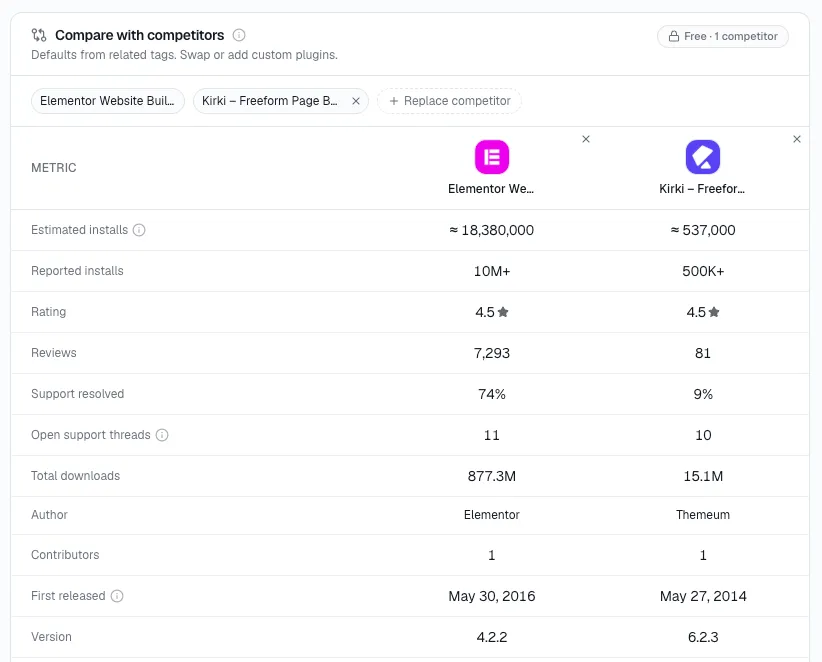
- Compare — plugins or themes side by side, metric for metric, more than two at once, which goes further than what ratings and installs alone show you (see how to compare WordPress plugins beyond ratings and active installs).
- Readme Checker — validating and fixing a plugin's own WordPress.org listing before it ships, which none of the other three tools offer at all; see how to check your WordPress plugin readme before publishing.
StatWP also tracks over 70,000 plugins and 15,000+ themes — theme coverage is a real gap across all three competitors, who are plugin-only tools as far as their public homepages show.
I don't think any of that makes the honest strengths above disappear. If the only thing you need is deep keyword-rank data for one plugin, PluginSpy goes further into that single question than StatWP does. If you specifically want a daily habit view with support-activity tracking baked in, WP-Rankings' dashboard framing is built for exactly that. If you just want one free, no-signup screen putting a plugin next to its closest rivals, WP Analyze does that cleanly. StatWP is the pick when the job is broader than any one of those — researching a niche, tracking growth over months, comparing more than two listings at once, and fixing your own plugin's listing — rather than a single narrow lookup.
FAQ
Is StatWP better than WP-Rankings, PluginSpy, or WP Analyze?
In my view, for a single, narrow job — daily-habit tracking (WP-Rankings), keyword-rank depth (PluginSpy), or a free one-screen competitor view (WP Analyze) — each of those tools does that specific job well. StatWP is the stronger pick when you need niche research, growth tracking, multi-way comparison, and a readme checker together, since it's the only one of the four that covers all of them.
Do any of these tools track WordPress themes, not just plugins?
Only StatWP does, with 15,000+ tracked themes alongside its plugin data. WP-Rankings, PluginSpy, and WP Analyze all appear to be plugin-only tools based on their public homepages.
Are WP-Rankings, PluginSpy, and WP Analyze free to use?
WP-Rankings and WP Analyze both offer free access — WP-Rankings caps free users at 5 keyword rankings and 3 comparisons per plugin, while WP Analyze's core lookup and comparison screen is free with an account. PluginSpy doesn't publish pricing details on its homepage as of this writing.
Which of these tools is best for tracking a plugin's keyword rankings?
PluginSpy, specifically. Its site is built around individual keyword pages showing every plugin ranking for a given search term, which is a deeper, more dedicated take on that one question than the other three tools offer.
Try it yourself
The comparisons above are worth checking against current numbers rather than taking on faith — StatWP's own Compare tool lets you put plugins or themes side by side with live data. If you want to see what a paid plan adds beyond the free tier, check StatWP's pricing page directly rather than relying on numbers quoted secondhand — plans and trial terms change, and the current page is the only accurate source.