
"This plugin broke my entire site" reads like a product flaw. Half the time it's actually a report about a conflicting theme, an incompatible plugin, or a hosting quirk that would have caused the same crash no matter which plugin happened to be active when it hit.
The reviewer isn't lying — they genuinely don't know the difference, and there's no reason they should. If you're researching a plugin you're thinking about competing with, or a niche you're considering entering, figuring out which is which is your job. Get it wrong and you could end up building a feature to fix a problem that was never really the plugin's fault. The same five questions below work whether you're reading through a plugin's reviews or a theme's.
Quick take: before you build a fix for a "this broke my site" review, run it through the five questions below — they tell you whether the report points to a real gap in your plugin or to someone else's theme, plugin, or hosting setup.
The Reviewer Isn't Always Wrong, But They're Not Always Right Either
Most WordPress site owners activate a plugin, see something break, and reasonably assume the last thing they touched is the cause. That's a fair guess on their end — it's also wrong often enough that treating every "this plugin broke my site" review as a confirmed product flaw will send you chasing an opportunity that isn't actually there.
The goal isn't to find reasons to dismiss complaints. It's to sort them accurately, so the real gaps go on your idea list and the environment issues get filtered out before you waste time scoping a feature for them.
Five Questions That Separate a Real Gap From an Environment Issue
- Does the review name anything else running on the site? A theme, another plugin, a specific host — any of these mentioned in the same breath as the problem is worth chasing before assuming the plugin's own code is at fault.
- Did the problem start right after activation, or after some other change? "Broke immediately on activation" points more toward the plugin itself. "Was fine for weeks, then broke" points toward something else that changed around the same time — a theme update, a host migration, another plugin update.
- Is the symptom something that plugin's code could plausibly cause? A plugin that only touches a settings page can't plausibly cause a checkout failure — if the described symptom is outside what the plugin actually does, the cause is almost certainly elsewhere.
- Does the complaint match what you'd expect on a clean install? If you can install the plugin yourself on a fresh WordPress site with a default theme and no other plugins and can't reproduce it, that's evidence — not proof — that something in the reviewer's specific stack is involved.
- Is this an isolated report, or does it match a cluster? One report of an unusual crash is more likely environment-specific. The same crash reported by several unrelated reviewers, with no common third-party plugin between them, is much more likely to be a genuine product gap worth noting.
Common Misattributions
I've found certain patterns show up often enough to be worth checking by default, before doing any deeper investigation:
| What gets blamed on the plugin | What's often actually happening |
|---|---|
| "White screen after activation" | A PHP version too old for the plugin's requirements, or a memory limit set too low by the host |
| "Broke my checkout / broke my forms" | A conflict with another plugin touching the same page, often a caching or minification plugin |
| "Settings won't save" | A security or firewall plugin blocking the save request, or a caching plugin serving a stale page |
| "Site got slow after installing" | Shared/low-tier hosting that was already near its resource limit before the plugin was added |
| "Looks broken / styling is wrong" | A theme with aggressive custom CSS overriding the plugin's own styles |
This is how I read it: none of these are guaranteed explanations for any specific review — they're the patterns worth checking first, not a verdict to assume without confirming.
How to Confirm It, Not Just Suspect It
I don't treat a suspicion as the same as a confirmed diagnosis. Before treating a complaint as a real gap worth building for, go through this sequence:
- Try to reproduce it on a clean setup — default theme, no other plugins, a supported PHP and WordPress version. Installing the plugin yourself is worth the ten minutes before you build a feature around someone else's bad experience.
- If it doesn't reproduce clean, add back the specific thing the reviewer mentioned — the theme they named, the plugin they named — and try again.
- Check whether other reviewers name the same third-party software. My take: a repeated name across several unrelated complaints is a much stronger signal than any single review's account.
- If it does reproduce clean, treat it as confirmed. That's a real product gap, not an environment issue, and it belongs on your idea list regardless of how the reviewer framed it.
Where the Complaint List to Check Comes From
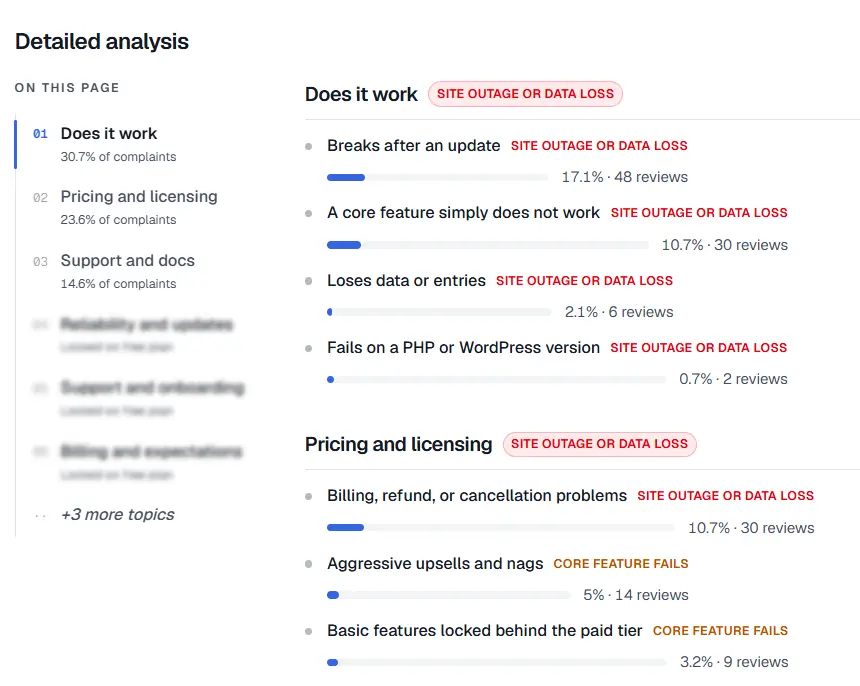
The detailed breakdown behind each complaint topic — this is the list to work through question by question.
Before you can run this diagnostic on anything, you need to know which complaints are worth the time — a single odd review isn't worth a full reproduction cycle. StatWP's Review Gap Finder groups a plugin's (or a theme's) reviews into complaint topics using AI and ranks them by severity, which is what tells you a "broke my site" pattern is showing up often enough — and looks severe enough — to be worth this level of checking, rather than being one person's unusual setup. The diagnostic questions above are what you apply once a topic looks worth the time, not a replacement for confirming the pattern exists first.
What This Means for Your Idea List
Once you've confirmed a complaint is really an environment issue rather than a product gap, drop it from your list of things worth building — it's not evidence of an opening, however loud the original review was. Keep the ones that survive this check: those are the complaints that are actually about the plugin itself, and worth weighing against each other for what to build first.
Frequently Asked Questions
What if I can't figure out what's causing a reported crash?
An unreproducible, unexplained crash is still worth logging even without a confirmed cause. I note what I tried and move on, then revisit it if the same symptom shows up again with more detail attached, or as part of a larger cluster.
Do I need to actually install a plugin I don't own to check this?
Installing the plugin yourself on a test site is the most reliable way to check, and it's usually free — most WordPress.org plugins and themes cost nothing to install even if you never intend to keep using them. A clean-install reproduction attempt is worth far more than guessing from the review text alone.
Is it ever worth counting a problem even if it's technically not the plugin's fault?
Yes, sometimes — if a common environment (a specific popular caching plugin, for instance) reliably breaks a plugin, I count that as a real, fixable weak point in that plugin's compatibility, even though the root technical cause sits elsewhere. A plugin built to handle that conflict better is still solving a real problem for its users.
Does confirming an environment issue mean the original review was unfair?
Confirming an environment issue doesn't mean the original review was unfair — a reviewer who genuinely lost hours to a crash had a bad experience regardless of which piece of software technically caused it. Confirming the cause changes whether it belongs on your idea list, not whether their frustration was legitimate.
How does this connect to reading the review itself closely first?
This gap-vs-setup-problem diagnostic assumes you've already translated the vague complaint into a specific, testable claim — see how to find the real complaint hiding in a 1-star review for that step, which comes before trying to confirm whether the claim is actually a product gap.
Not every bad review points to a real gap, and not every bad review is unfair to the plugin either — the five questions above are how you tell which is which before you spend real time scoping a feature around either one. For where this fits into the bigger workflow, see how to turn a plugin's bad reviews into your next feature idea.