
Two plugins can have the exact same complaint — "settings don't save" — and mean two completely different things for someone researching that market. One broke last week with a release. The other has been true for two years and everyone's just used to working around it.
The complaint text alone can't tell those apart. The dates can. Here's how to read a complaint pattern in time, not just in content — and why the chronic one is usually the more interesting find if you're looking for something to build.
The key takeaway: To tell if a WordPress plugin complaint pattern is new or ongoing, read the dates on the reviews, not just the complaint text - the same complaint can mean a fresh regression or a two-year-old known limitation people have just learned to work around.
Why Timing Changes What a Complaint Means
If you're researching a plugin (or a theme) — a competitor's, or one you're sizing up in a niche you're considering — a complaint's importance isn't just about how many people are hitting it. It's about whether the number is climbing, flat, or already priced in. A fresh problem is a temporary opening: the plugin will likely patch it soon, and the users complaining about it aren't going anywhere else because of it. A chronic problem is different — it's a standing gap the plugin's own team has had years to fix and hasn't, which is a much stronger signal that there's room to build something better.
Treating both the same way — as one undifferentiated pile of "negative reviews" — means a two-week-old regression can look just as promising as a genuine, years-old gap in the product, purely because the fresh one happens to be loud right now.
Two Signatures: a Fresh Break vs. a Chronic Limitation
Each type tends to leave a different shape in the review timeline once you actually look at when the complaints were posted, not just what they say.
| Signal | Fresh break | Chronic limitation |
|---|---|---|
| First appearance | Clustered tightly around one date, often right after a version bump | Spread evenly across a long stretch of time, no clear starting point |
| Review volume shape | A sudden spike compared to the weeks before it | A steady, low-level trickle month after month |
| Reviewer language | Often mentions "used to work," "worked fine before," or a specific update | Often phrased as a flat statement of what the plugin can't do, with no before/after comparison |
| Version mentions | Reviewers frequently name a version number or say "after updating" | Version numbers are rare or inconsistent across the complaints |
My working read: none of these signals is proof by itself — a coincidence can produce a cluster, and a genuinely fresh problem can trickle in slowly if the update reached users gradually. I weigh them together rather than deciding from one.
Why the Chronic Pattern Is the Stronger Opportunity
A fresh break tells you the plugin's team is probably already on it — that's a bad thing to build a business case around, because it might be gone by the time you'd ship anything. A chronic limitation tells you the opposite: the team has had years and hasn't fixed it, whether because it's genuinely hard, it's not a priority for them, or it conflicts with some other decision they've made. Any of those reasons leaves the door open for a plugin — or a specific feature — built specifically to close that gap.
Here's the thing I keep noticing: that's the read worth prioritizing when you're using a complaint pattern as market research rather than as a personal to-do list: a fresh spike is interesting context, but a chronic, unaddressed pattern is the stronger evidence that there's a real, standing gap worth building for.
How to Actually Check the Dates
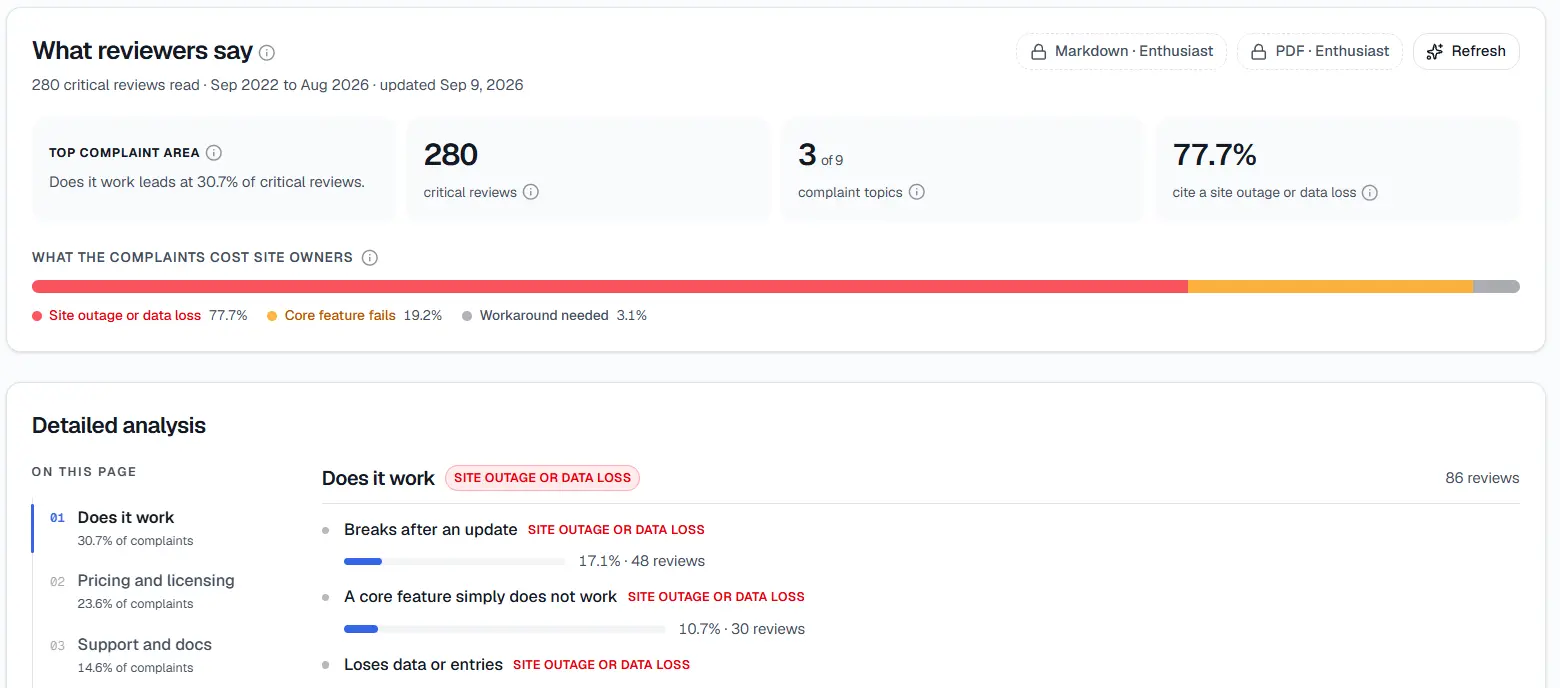
Review Gap Finder's summary panel - the read window at the top is the first place to check whether a complaint is fresh or old.
I find the check itself simple, just tedious to do by hand across a large review set:
- Note the date on every review in the complaint cluster, not just the most recent one or two.
- Plot them against the plugin's release history. If a cluster's first appearance lines up within a week or two of a specific release, that's the strongest single piece of evidence for "fresh."
- Check whether the pace is speeding up, flat, or slowing down. A cluster that's accelerating month over month is one I peg as a live, worsening problem — worth watching, but risky to build a whole plan around before it's clear the plugin's team won't just fix it. One that's held a steady low rate for a long stretch is a known limitation people have learned to live with — the stronger signal.
Borrow the Month-Over-Month Habit From Growth Tracking
This is the same discipline StatWP's growth-tracking tools apply to install and download numbers — measuring plugin growth month over month exists specifically because a single month's number, in isolation, doesn't tell you whether a plugin is gaining or losing ground. A complaint count works the same way: one month's total means little without the months before it to compare against.
The practical version: don't just count how many reviews mention a complaint topic in total. Break that count out by month, the same way you'd look at a monthly install trend, and look at the shape of the line, not just the sum at the bottom.
Where the Complaint Topic and the Dates Both Come From
StatWP's Review Gap Finder groups a plugin's (or a theme's) reviews into complaint topics using AI and ranks them by severity — that grouping is what tells you a pattern exists at all. Once you have a topic, going back through the reviews inside it for dates and version mentions is the manual step that tells you whether that pattern is fresh or chronic. The tool gets you to the cluster; the timeline read described above is what you do with it.
Check a Plugin's Complaint Timeline
What Each Type Actually Means for Your Research
The two types earn different responses, not just different urgency levels:
- Fresh break: Note it, but don't over-weight it. It's context about the plugin's release quality, not necessarily a lasting opening — the team may well fix it before you could build anything around it.
- Chronic limitation: Treat it as the real signal. Ask how many reviewers keep raising it, how severe it looks — prioritizing which patterns are actually worth building a feature for covers that next step — and whether it's something you could realistically build well.
A Note on Small Review Counts
The fresh-versus-chronic read above assumes there's enough volume in a complaint cluster to see a shape at all. With only two or three reviews total, "clustered tightly around one date" and "spread evenly over time" can look identical just by chance — there aren't enough data points yet to tell a real pattern from noise.
In that situation, lean more heavily on the qualitative signals — version mentions, "used to work" phrasing — than on the shape of the timeline itself. Also make sure what you're reading is actually a product issue in the first place, not a setup problem being misattributed to the plugin — a thin cluster is especially easy to misread either way.
Frequently Asked Questions
What if a complaint cluster has both an old trickle and a recent spike?
I mark that as two separate issues that happen to share similar wording — a long-standing minor limitation and a new, unrelated regression can produce very similar-sounding complaints. Split the timeline at the point the pace changes and read each half on its own.
How far back should I look when checking release history?
I go back to at least the plugin's last two or three releases when checking release history — a fresh complaint doesn't always start the same week as an update if the update rolled out gradually to auto-updating sites.
Does a chronic complaint ever become urgent again, from a research standpoint?
Yes — watch for a chronic, low-level pattern that suddenly accelerates. That's usually a sign something changed on the WordPress or hosting side that made an old limitation newly painful, which can turn a slow-burn opportunity into a timely one.
Can a fresh break and a chronic limitation share the exact same wording?
Yes, and that's exactly why the dates matter more than the phrasing. "Settings don't save" describes both a brand-new regression and a years-old known bug identically — the words alone can't tell them apart, which is the whole reason to check the timeline instead of trusting the sentence.
Where does this fit relative to deciding what's worth building?
Timing is one input into that decision, not the whole thing — prioritizing which plugin complaints are worth building a feature for covers how to weigh timing against frequency and severity together.
A complaint pattern's content tells you what's wrong. Its timeline tells you whether that's a fleeting bug or a standing opportunity. Check both before deciding what's worth your time — see the full workflow for turning a plugin's bad reviews into a feature idea for where this step sits in the bigger process.